
Connect from a PC
Install the Windows App Desktop client
Not compatible with Windows 8 or 8.1. Refer to the bottom of this page for instructions if using either of these Windows versions.
Download and install the client from the link below or search the Microsoft Store for “Windows App”.
Once installed, the client can be launched from the Start menu by searching for Windows App. The program icon looks like this: 
Sign in to the Windows App
- Open the Windows App you installed in the step above.
- Select Sign in.
- Enter your WP email address. If you receive a prompt to send a sign in request to your phone, click Send notification and use the Microsoft Authenticator app on your smartphone to authenticate, otherwise enter your WP computer password.
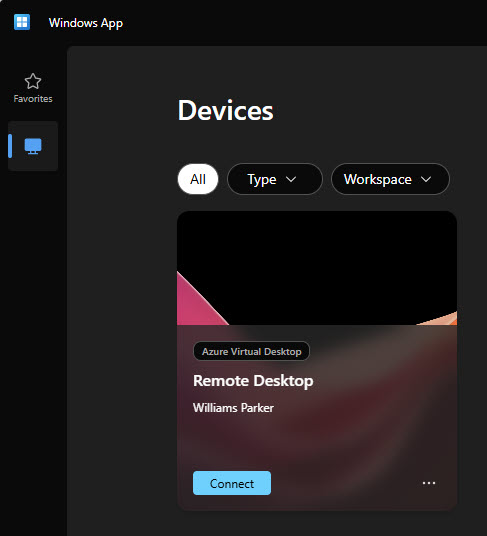
- In the Windows App under Devices click Connect. Enter your WP email address and computer password at the prompt.
- At the Duo prompt, approve the sign-in using the Duo Mobile app on your smartphone.
- Each subsequent time you need to connect remotely, launch the Windows App from your Start Menu and click Connect.
Connect from a Mac or iPad/iPhone
Applies to: Mac OS 12.0 or later / iOS 17.0 or later for iPad and iPhone
Install the Windows App
Download and install the Windows App on your Mac OS or iOS device.
Sign in to the Windows App
- Open the Windows App you installed in the step above.
- Within the Windows App select the Devices tab and click the “+” icon. Select Add Work or School Account.
- Sign in using your WP email address and computer password. If you receive a prompt to send a sign in request to your phone, click Send notification and use the Microsoft Authenticator app on your smartphone to authenticate, otherwise enter your WP computer password.
- In the Windows App under Devices double click Remote Desktop to connect. If prompted, enter your WP email address and computer password.
- At the Duo prompt, approve the sign-in using the Duo Mobile app on your smartphone.
- Each subsequent time you need to connect remotely, launch the Windows App and double click Remote Desktop on the Devices tab.
Windows 8 or 8.1
Using Google Chrome or Microsoft Edge, click the link below to access the remote system directly through the browser. When prompted, use your WP email address and computer password to sign in.